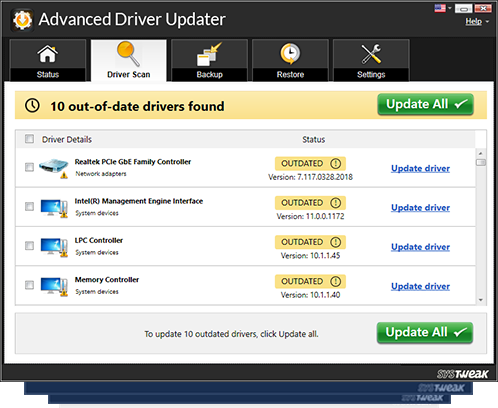
Update ALL PC Drivers
With a Single Click
Your PC is now running on:
Advanced Driver Updater is designed to automatically install and update the latest authentic drivers for your operating system.

Install > Run Scan > Update Drivers
Install drivers for...

LAPTOPS

DESKTOP

PRINTERS

SMART PHONES

SCANNER
USB DRIVES
MOTHERBOARD
MFP DEVICES

WIRELESS

AUDIO/VIDEO CARDS

BLUETOOTH
GRAPHICS
Install > Run Scan > Update Drivers
To achieve peak performance on Windows systems, it’s necessary to have the right device drivers. Most drivers are installed along with the operating system. However, with time they get outdated, resulting in poor system performance and limited hardware functionality. Therefore, it is very important to update the drivers on your system from time to time.
To do so manually is a tedious task. You first have to determine the model and make of the hardware device, go to the manufacturer’s website, then download and install the most recent and updated drivers for it. Most of the times, you will have problems finding the right driver for your computer, or the one you install may be incompatible.
Using Advanced Driver Updater, this can be done easily, quickly and efficiently. Advanced Driver Updater has an extensive database which consists of the latest and most updated drivers in the market. It scans your system and displays a list of outdated drivers. All you need to do to update to the most recent ones is click a button.
Types of Windows Drivers Supported
Advanced Driver Updater supports hundreds of device drivers and allows you to search through all drivers that are detected by the tool. Listed below are the drivers supported by Advanced Driver Updater:
- Audio Inputs and Outputs
- Computer
- Disk Drives
- Display Adapters
- Firmware
- Human Interface Devices
- IDE ATA/ATAPI Controllers
- Imaging Devices
- Keyboards
- Mice and other Pointing Devices
- Monitors
- Network Adapters
- Ports (COM & LPT)
- Print Queues
- Printers
- Processors
- Software Devices
- Sound, Video and Game Controllers
- Storage Controllers
- Storage Volume Shadow Copies
- Storage Volumes
- System Devices
- Universal Serial Bus Controllers
- WSD Print Provider
Minimum System Requirements
- Windows 11, 10, 8.1, 8, 7
- 1 GHz Processor
- 512 MB RAM
- 500 MB free space on HDD
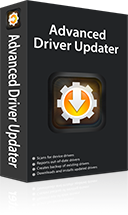
| Download File | : | Advanced Driver Updater |
| Manufacturer | : | systweak.com |
| Total downloads | : | 71,342,326+ |
| Download size | : | 8.6 MB |
| Compatibility | : | Windows 11, 10, 8.1, 8 & 7 |
| Requirements | : | 1 GHz Processor, 512 MB RAM, 500 MB HDD |
Install > Run Scan > Update Drivers
 One-Click Driver Update
 200% Larger Database
 Accelerated Download
 Improved System Performance
 100% Money-Back Guarantee
 WHQL Tested Drivers
 Supports Windows 11, 10, 8.1, 8, and 7
 24/7 Technical Support
Genuine & Certified Drivers
Advanced Driver Updater sources driver updates directly from the manufacturers (like DELL, HP, REALTEK, ACER, LENOVO, BROTHER and many more. This ensures you get the correct drivers automatically for your windows PC.
AppEsteem Ceritified

Install > Run Scan > Update Drivers
 Advanced Driver Updater
This outstanding and powerful driver updater tool detects outdated, missing and incompatible drivers and allows you to update them in a single click to enjoy uninterrupted and improved PC performance.

